
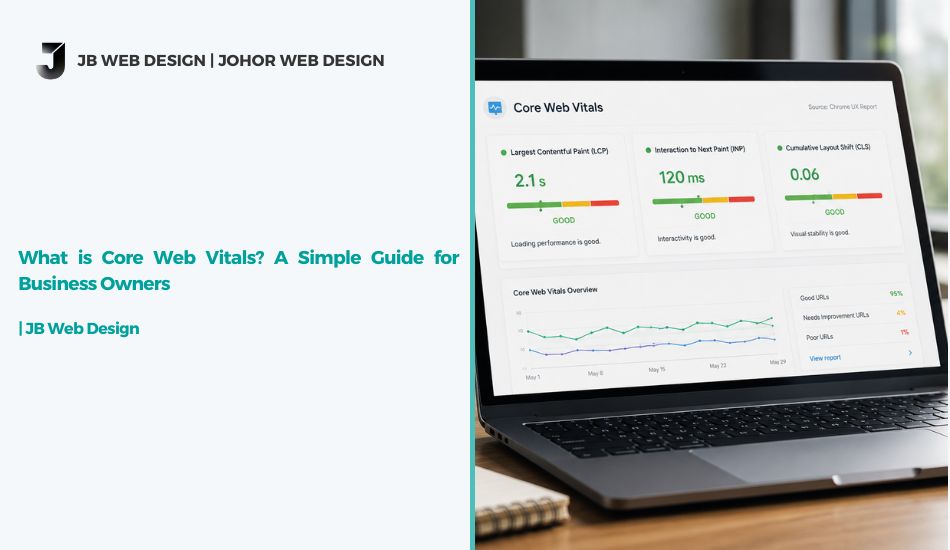
What is Core Web Vitals? A Simple Guide for Business Owners
If you own a website and someone tells you it’s “failing Core Web Vitals,” here’s the short answer: your site is probably loading too slowly, reacting too slowly when people click things, or shifting around while it loads — and Google is quietly marking that down. Fix those three things, and both your visitors and your search rankings tend to improve.
That’s the conclusion. Now let’s unpack what it actually means for a business owner in Malaysia who isn’t a developer.
What Exactly Is Core Web Vitals?
Core Web Vitals is a set of three measurements Google uses to judge how a real visitor experiences your website — not how fast it looks in theory, but how it actually feels to someone browsing on their phone at a kopitiam with average 4G signal.
The three metrics are:
- Largest Contentful Paint (LCP) — how long it takes for the main content (like a hero image or headline) to appear. Google considers under 2.5 seconds to be good.
- Interaction to Next Paint (INP) — how quickly your site responds when someone taps a button or fills a form. Anything under 200 milliseconds is considered responsive.
- Cumulative Layout Shift (CLS) — whether your page jumps around while loading (like a button moving right as someone tries to tap it). A score under 0.1 is ideal.
Together, these three numbers make up what Google calls Core Web Vitals, and Google evaluates them using real-world data collected from actual visitors, not lab tests alone. You can read Google’s own explanation of how this works on their Search Central documentation.
Why This Matters for Website Performance
Here’s where it gets practical. Website performance isn’t just a technical nice-to-have — it directly shapes how visitors behave on your site. A slow-loading page in Malaysia, where a large share of browsing happens on mobile data, often means visitors leave before your page even finishes loading. If someone taps “Add to Cart” and nothing happens for a second or two, most people don’t wait around — they close the tab.
Poor website performance quietly costs businesses money in ways that don’t show up until you actually measure it: abandoned carts, shorter time on site, and fewer enquiries submitted through your contact form.
Is Core Web Vitals One of the SEO Ranking Factors?
Yes — but it’s worth being honest about where it sits. Core Web Vitals is one of several SEO ranking factors Google considers, but it’s not the most powerful one. Content quality, relevance to what people are searching for, and trustworthy backlinks still carry more weight overall.
That said, Core Web Vitals acts as a supporting signal. If two websites offer similarly useful content, the one that loads faster and feels smoother to use has a real edge. For businesses competing in a crowded local market — like retailers, clinics, or service providers across Malaysia — that edge can be the difference between showing up on page one or getting buried on page two.
How to Check Your Score
You don’t need technical training to check this yourself. Google’s free PageSpeed Insights tool will scan your website and show you exactly where LCP, INP, and CLS stand — along with a simple “Good,” “Needs Improvement,” or “Poor” label for each.
If your site shows red or orange scores, that’s usually a sign of large unoptimized images, too much JavaScript loading at once, or a hosting setup that isn’t built for speed.
What You Can Do About It
Most Core Web Vitals problems trace back to a handful of common causes:
- Oversized images that haven’t been compressed
- Too many plugins or scripts running in the background
- Ads or embedded elements loading late and pushing content around
- Slow or overloaded web hosting
Some of these are quick fixes. Others — especially ones tied to how a website was originally built — need a proper technical review rather than a quick patch.
Final Thoughts
Core Web Vitals isn’t something you need to obsess over daily, but ignoring it entirely tends to catch up with you — usually in the form of higher bounce rates and a website that quietly underperforms in search. If your website feels sluggish or you’re not sure where it stands, our SEO services include a full technical review of your Core Web Vitals scores as part of building a stronger, faster foundation for your site.


What is Core Web Vitals? A Simple Guide for Business Owners
If you own a website and someone tells you it’s “failing Core Web Vitals,” here’s the short answer: your site is probably loading too slowly, reacting too slowly when people click things, or shifting around while it loads — and Google is quietly marking that down. Fix those three things, and both your visitors and your search rankings tend to improve.
That’s the conclusion. Now let’s unpack what it actually means for a business owner in Malaysia who isn’t a developer.
What Exactly Is Core Web Vitals?
Core Web Vitals is a set of three measurements Google uses to judge how a real visitor experiences your website — not how fast it looks in theory, but how it actually feels to someone browsing on their phone at a kopitiam with average 4G signal.
The three metrics are:
- Largest Contentful Paint (LCP) — how long it takes for the main content (like a hero image or headline) to appear. Google considers under 2.5 seconds to be good.
- Interaction to Next Paint (INP) — how quickly your site responds when someone taps a button or fills a form. Anything under 200 milliseconds is considered responsive.
- Cumulative Layout Shift (CLS) — whether your page jumps around while loading (like a button moving right as someone tries to tap it). A score under 0.1 is ideal.
Together, these three numbers make up what Google calls Core Web Vitals, and Google evaluates them using real-world data collected from actual visitors, not lab tests alone. You can read Google’s own explanation of how this works on their Search Central documentation.
Why This Matters for Website Performance
Here’s where it gets practical. Website performance isn’t just a technical nice-to-have — it directly shapes how visitors behave on your site. A slow-loading page in Malaysia, where a large share of browsing happens on mobile data, often means visitors leave before your page even finishes loading. If someone taps “Add to Cart” and nothing happens for a second or two, most people don’t wait around — they close the tab.
Poor website performance quietly costs businesses money in ways that don’t show up until you actually measure it: abandoned carts, shorter time on site, and fewer enquiries submitted through your contact form.
Is Core Web Vitals One of the SEO Ranking Factors?
Yes — but it’s worth being honest about where it sits. Core Web Vitals is one of several SEO ranking factors Google considers, but it’s not the most powerful one. Content quality, relevance to what people are searching for, and trustworthy backlinks still carry more weight overall.
That said, Core Web Vitals acts as a supporting signal. If two websites offer similarly useful content, the one that loads faster and feels smoother to use has a real edge. For businesses competing in a crowded local market — like retailers, clinics, or service providers across Malaysia — that edge can be the difference between showing up on page one or getting buried on page two.
How to Check Your Score
You don’t need technical training to check this yourself. Google’s free PageSpeed Insights tool will scan your website and show you exactly where LCP, INP, and CLS stand — along with a simple “Good,” “Needs Improvement,” or “Poor” label for each.
If your site shows red or orange scores, that’s usually a sign of large unoptimized images, too much JavaScript loading at once, or a hosting setup that isn’t built for speed.
What You Can Do About It
Most Core Web Vitals problems trace back to a handful of common causes:
- Oversized images that haven’t been compressed
- Too many plugins or scripts running in the background
- Ads or embedded elements loading late and pushing content around
- Slow or overloaded web hosting
Some of these are quick fixes. Others — especially ones tied to how a website was originally built — need a proper technical review rather than a quick patch.
Final Thoughts
Core Web Vitals isn’t something you need to obsess over daily, but ignoring it entirely tends to catch up with you — usually in the form of higher bounce rates and a website that quietly underperforms in search. If your website feels sluggish or you’re not sure where it stands, our SEO services include a full technical review of your Core Web Vitals scores as part of building a stronger, faster foundation for your site.